Synchronizing the role model across environments: how we got rid of “only works in production”
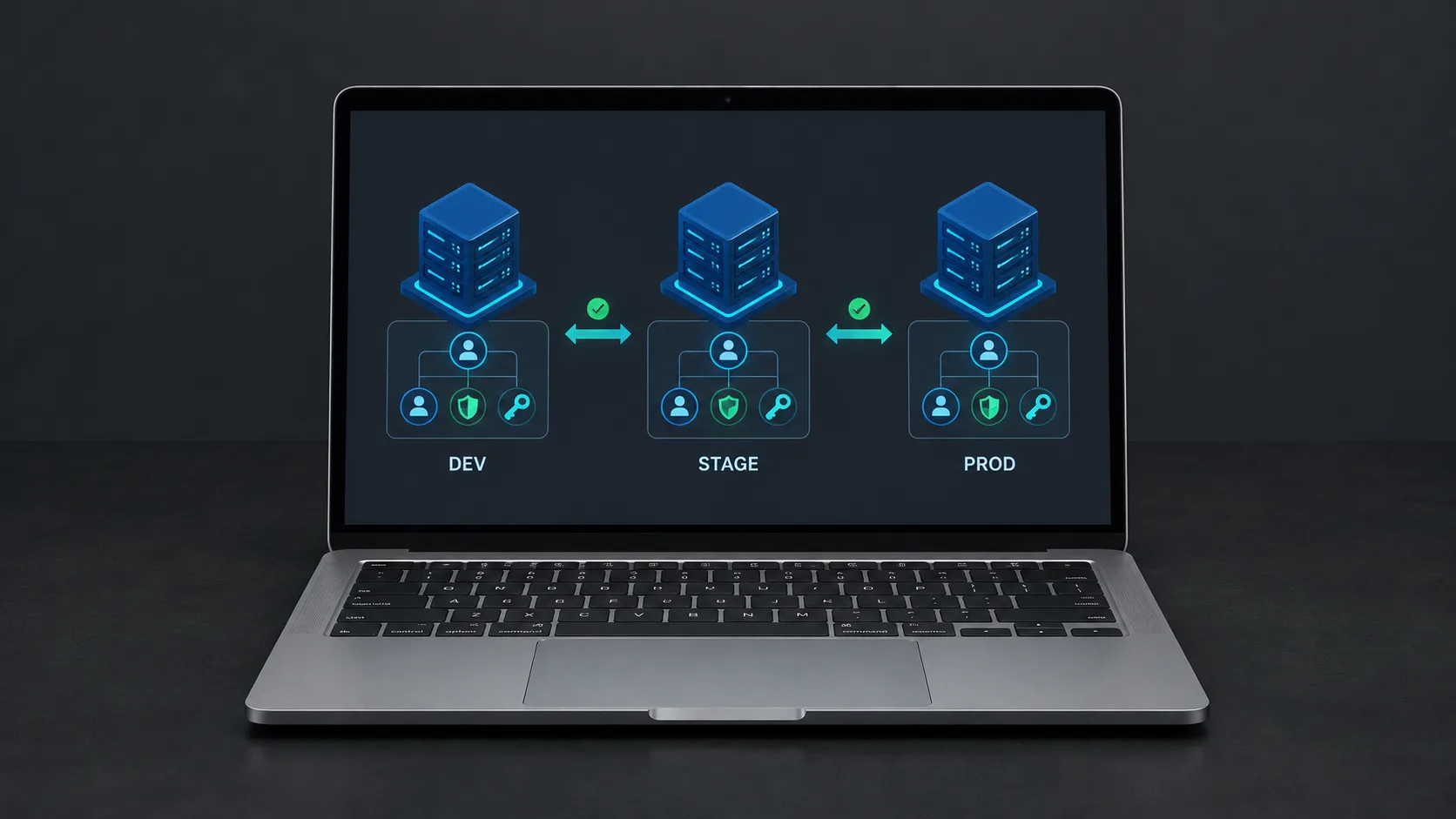
Support and managers maintained the role model only in prod, leaving test and preprod incomplete and some scenarios impossible to reproduce. We implemented one-way synchronization from prod, with additions, deletions, ignore flags, slug-based matching, and cron or admin-panel triggers. The role model is now **consistent** across environments.
The Problem: “It Only Works in Production”
Let’s recap. In our article on the role model, we explained how we implemented a flexible access control system: roles + organizations + custom permissions, a permissions matrix, a management interface, and a change history.
But the system had one characteristic that eventually became a problem.
How it worked
The project had three environments: test, pre-production, and production.
Support staff and managers maintained the role model only in production.
Test and pre-production received an incomplete version of the role model, with updates reaching them only after changes had been made in production.
What this meant in practice
- Some production scenarios were impossible to reproduce in test or pre-production.
- The underlying issue was environment drift: production data differed from test data.
- Testing the role model became a guessing game: “What does it actually look like in production?”
It was the classic “It works locally, but not in production” situation—only this time, it affected the role model across the entire project.
The Solution: Synchronizing the Role Model
We analyzed the problem and built a synchronization system. Here are its main components.
1. Synchronizing Both Additions and Deletions
Synchronization needs to reflect the complete state of the role model. If a role is added in production, it should appear in test and pre-production. If it is deleted, it should be removed there as well.
This matters because otherwise, environments accumulate stale entities that no longer exist in production.
2. Ignore Flags for Roles, Permissions, and Groups
We added an ignore flag to roles, permissions, and groups to exclude them from synchronization—both additions and deletions.
Why is this useful?
- To prevent required entities from being deleted. For example, the test environment might contain an entity needed for testing that does not exist in production. The ignore flag protects it from deletion.
- To prevent unwanted entities from being added. If an entity is marked as ignored, it will not be synchronized.
This provides fine-grained control over what gets synchronized and what remains specific to each environment.
3. Test and Pre-Production Synchronize Only from Production
Synchronization is strictly one-way: from production to test and pre-production. Production cannot receive synchronized data from another environment.
The reasoning is straightforward:
- Production is the source of truth for the role model.
- Test and pre-production are recipients.
- Reverse synchronization—from test to production—would introduce the risk of test changes reaching production.
4. Two Ways to Trigger Synchronization: Cron and an Admin Button
We implemented two ways to start synchronization:
- Scheduled background execution using cron and Laravel’s scheduler. Synchronization runs every hour during working hours, from 09:00 to 18:00.
- Manual execution using a button in the admin panel. The button is available only in test and pre-production, controlled through configuration.
Why provide both?
Cron keeps the environments synchronized regularly without human intervention.
The button handles situations where synchronization is needed immediately—for example, after an urgent production change.
5. Matching Records by Slug
Records are matched by slug rather than UUID.
Why?
A UUID is unique, but it was not intended to serve as a lookup key for matching records in this workflow.
A slug is a human-readable identifier that allows us to match entities across environments.
6. API Protection: An IP Allowlist and API User Permissions
The production API endpoint was restricted to an IP allowlist. It also checked the API user’s permissions: not every API user could access this endpoint.
Why?
- The IP allowlist protects against unauthorized requests from outside the permitted network addresses.
- API user permissions provide an additional layer of control: only authorized users can request role model data.
7. Separate Users for Test and Production, with Bearer Tokens
We created separate users for test and production, authenticated using bearer tokens with a 24-hour lifetime.
Why?
Separate users provide isolation: if a test token is compromised, it does not compromise the production user’s credentials.
A bearer token with a 24-hour lifetime balances security and convenience: it avoids repeating the login process for every request while expiring automatically.
How It Works: The Full Synchronization Cycle
Here is the synchronization process from start to finish:
- A support team member or manager adds a new role, permission, or group in production.
- Cron—or the admin panel button—triggers synchronization in test and pre-production.
- A request is sent to the production API with a bearer token, originating from an allowlisted IP address.
- The production API checks the API user’s permissions and returns the role model data.
- Test and pre-production match records by slug to determine what needs to be added and what needs to be deleted.
- Ignore flags are taken into account: flagged entities are excluded from synchronization.
- The changes are applied, updating the role model in test and pre-production.
The Result: Synchronization Is Working
We implemented everything described above, and role model entities now synchronize successfully across environments.
Technology Stack
- Backend: Laravel (PHP)
- Scheduling: cron + Laravel Scheduler
- API: bearer tokens and an IP allowlist
- Record matching: slugs
What We Learned
1. Environments Need to Be Comparable
If test and pre-production do not reflect production, testing loses its value. Synchronizing the role model made the environments comparable.
2. One-Way Synchronization Is Safer
Synchronizing only from production to test and pre-production eliminates the risk of test changes being pushed into production through the synchronization process.
3. Ignore Flags Provide Flexibility Without Chaos
Not everything needs to be synchronized. Ignore flags preserve environment-specific entities without disrupting the overall model.
4. API Security Is Essential
An IP allowlist and bearer tokens with a limited lifetime provide baseline protection for an API that exposes role model data.
Conclusion
This experience showed us that a role model is more than a management interface and a permissions matrix. It also requires infrastructure: synchronization across environments, API protection, and mechanisms for matching records.
We built a system that helped the team move beyond “It only works in production.” Test and pre-production now reflect the actual role model, making testing more predictable.